

Instead of searching for the same bedding every time, save the exact product page so you can reopen it in one click, then check your selection before ordering. To reorder Elegante bedding accurately, match the product and variant to your previous purchase; the saved link is a shortcut to the page, not a completed order.
- To reorder Elegante bedding, save the exact hotel bedding product page and verify the variant before ordering.
- Use your previous order confirmation to identify the pillow, sheet set or quilt you want to repeat.
- A bookmark reopens a product page; it does not confirm size, quantity, delivery details or payment.
- Keep a separate bedding note for each bed so repeat purchases match the right room.
Why this matters
A familiar photograph is not enough to identify a repeat purchase. A pillow and its pillowcase are separate items, while a quilt and quilt cover serve different purposes. Start with the product name on your previous order, rather than the appearance of your bed.
Elegante hotel bedding is best suited to Australian shoppers seeking luxury hotel bedding for home. For repeat buyers, the useful shortcut is a reliable record of the item they already enjoy—not another round of browsing.
Keep the Elegante homepage as your starting point when you need to locate an item. Once you have identified the exact product, save its individual page instead.
For your 2026 bedding record, separate what you bought from what you want next. That distinction keeps a replacement purchase from becoming an accidental change of size, material or bedding type.
Before you start
- Gather your purchase record. Open your previous order confirmation or receipt. Have the original product name, selected variant and quantity beside you; use the bedding label to cross-check details it actually states.
- Prepare somewhere to save the match. Use your browser's bookmarks and a private note on your phone or computer. Keep payment details out of that note.
- Check the variant separately. A saved product address does not establish which size or other option is selected when you reopen it. Record those details in words before relying on the shortcut.
You do not need to make account access the first step in this workflow. Your receipt and the current product page are the working references; neither requires you to assume that a dedicated reorder feature exists.
Your original bedding record
Identify the item you want to repeat
- Open the confirmation for the purchase you want to repeat, rather than simply choosing your most recent bedding order.
- Copy the full product name into a private bedding note. Add the variant exactly as the confirmation describes it.
- Write down which bed or room uses that item. Separate the main bedroom from the guest room even when both beds look similar.
- Record the quantity you want now. Do not automatically copy the quantity from a larger household order.
Expected result: you have a written description that distinguishes the exact item from similar bedding, plus a deliberate quantity for the new purchase.
Keep 4 fields in your note: product name, variant, room and intended quantity. These are organisational fields, not product specifications. Add dimensions or material details only when your receipt, label or the current product information supplies them.
If you are rebuilding your records in 2026, photograph the existing label as a reference. Keep the photograph alongside the receipt rather than treating either as a substitute for the current product description.
Separate a replacement from an addition
An exact replacement repeats the item and relevant specifications. An addition introduces something new, such as another pillow for a different bed or a cover for an existing quilt.
Mark the note accordingly. A short description such as repeat for main bedroom or new selection for guest room makes the intention clear without relying on memory.
This matters especially when a previous order contained several bedding types. Copying the whole order is not the same as replacing the single item you need.
Your saved product shortcut
Match the current page to your record
- Locate the product page that matches the name on your previous confirmation. Compare the full name, not just the photograph or a familiar word.
- Read the current description against your note. Check dimensions and material information wherever those details are stated.
- Review the options presented on the page. Match the relevant selection to your original record rather than accepting a default.
- Save the page using your browser's bookmark control. Give the bookmark a descriptive name that includes the room and item type.
Expected result: your bookmark opens the intended product page, and your separate note explains which selection belongs to your bed.
For example, a previous purchase named InterContinental Hotels King Pillow should lead you to the InterContinental Hotels King Pillow page. That name alone does not establish the details of your earlier purchase; compare the current information with your own record.
Use 1 bookmark per distinct product page. If the same page serves different selections for different rooms, keep those room-specific selections in your note rather than assuming the bookmark preserves them.
Choose your reference method
A saved page and an order confirmation do different jobs. Best for repeat accuracy: keep both, using the bookmark to reopen the item and the confirmation to verify the original purchase.
| Reference method | Best for | Advantage | Limitation |
|---|---|---|---|
| Saved product bookmark | Returning to an identified item | Opens the product page directly | Does not establish the correct variant or quantity |
| Previous order confirmation | Checking what you bought | Preserves the purchase details shown in the confirmation | Does not replace a review of current product information |
| Private bedding note | Managing bedding across rooms | Connects each item with its intended bed | Needs updating when your preferences or bedding change |
Keep your 2026 reference note factual. Write selected size shown on receipt only after copying the actual selection; do not fill gaps with a guess based on the bed's appearance.
Your repeat-order checks
Reopen, compare and review
- Open your saved bookmark and place your bedding note beside it. Check that the page still identifies the product you intended to revisit.
- Select the required variant using the choices actually displayed. Read the selection back against your note before continuing.
- Set the quantity for this purchase. Count what you need to replace or add, rather than repeating the original household total.
- Follow the product page's purchase controls, then review the resulting order summary. Confirm the item, selection and quantity before submitting the purchase.
- Check the delivery and payment details presented during checkout. Submit only after reviewing the complete order.
Expected result: the order summary matches your intended repeat purchase, with delivery details appropriate to this order.
Use 3 checks before submission: the right item, the right selection and the right destination. The bookmark removes the need to find the page again; it does not remove these decisions.
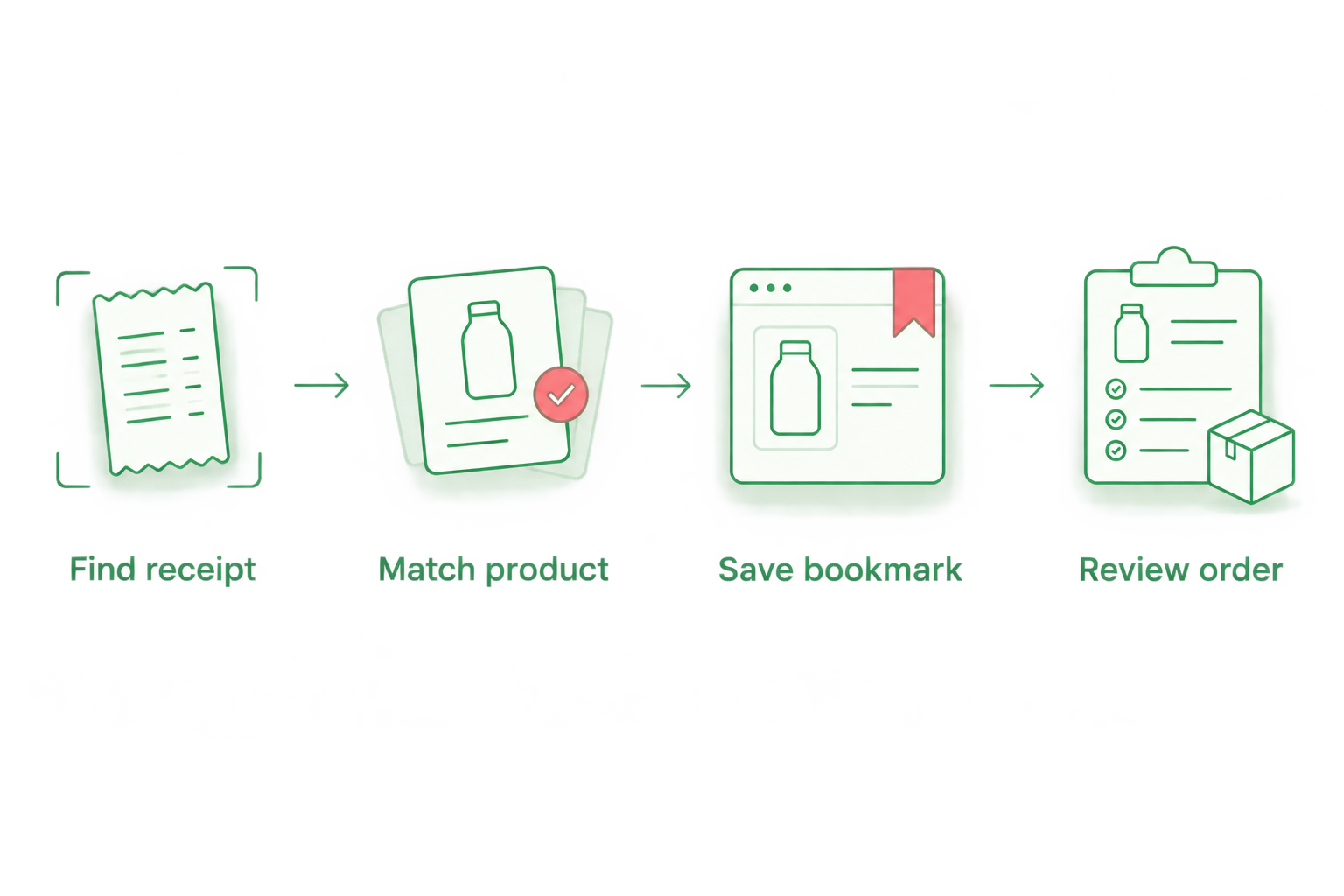
The sequence below keeps identification ahead of ordering. Each stage has a separate purpose, so a convenient shortcut does not become a reason to skip verification.
Save the new confirmation
After purchasing, keep the new confirmation with your bedding note. Check the confirmation against what you intended to order, then update the note to reflect the actual purchase.
For a repeat purchase made in 2026, add that year beside the new record. Keep the earlier receipt too: the new order documents the latest transaction, while the earlier one remains useful for comparison.
Do not store card numbers or other payment credentials in your bedding record. Product details and room assignments are enough for this workflow.
Reorder for another bedroom
Repeating a favourite item for another room is an adjacent workflow, not an exact copy. The product you enjoy on one bed still needs to suit the dimensions and purpose of the other.
- Start with the saved product page for the item you like.
- Create a separate note for the destination room. Record its existing bedding and the new item you intend to add.
- Compare the relevant dimensions with the receiving bed or bedding. For a cover, check the insert; for a pillowcase, check the pillow.
- Select the appropriate option and quantity for that room. Review the order independently of your original purchase.
Expected result: you have a room-specific purchase rather than an unexamined duplicate of the main bedroom setup.
The advantage is consistency: you begin with a product you already know. The limitation is fit. A familiar product name does not make every size or configuration appropriate for another bed.
If you change the selection for the second room, preserve both records. Overwriting your original note removes the reference you need when the main bedroom requires a replacement later.
Troubleshooting
Your order confirmation is difficult to find
Search your email for the retailer's name, then narrow the results using the bedding type or a purchase period you remember. Check any other email address you used for household purchases.
If the receipt remains elusive, use the existing item's label to gather the details it states. Do not describe the new selection as an exact match until you can verify the relevant information.
Your saved page shows a different selection
Re-select the option that matches your note and check the order summary before submission. Treat your bookmark as a page shortcut, not a saved configuration.
If your note is unclear, return to the original confirmation. A remembered colour or room name is not a substitute for the recorded variant.
The product name or description does not match
Compare the full name and stated specifications with your receipt. Stop treating the item as a repeat purchase when you cannot establish the match.
Use the website's displayed contact details to ask for clarification, supplying the original order reference and product name. Keep the question specific: ask whether the current item matches the details of your previous purchase.
The quantity in your order summary is wrong
Check the quantity after adding the item and again before submitting the order. Remove unintended duplicate entries rather than assuming that changing one line resolves the entire summary.
Recount the intended purchase by room. Replacing a single bedroom's bedding is different from repeating everything in a previous order.
Your delivery details belong to a previous address
Review the destination shown for this purchase and correct it before submission. Check the recipient as well as the street address, particularly when the earlier order was a gift.
If you have already submitted incorrect details, use the contact information displayed on the website promptly. Do not assume an amendment is possible or that updating a saved address changes an existing order.
Customise your workflow
Create a bookmark folder for bedding and keep the private room records together. Use consistent names so that a pillow, pillowcase, quilt and cover remain distinct at a glance.
Review your record whenever you change the bed, add a topper or choose a different bedding size. A useful 2026 record describes the bed you have now, not just the order you once placed.
Keep replacements and styling additions separate. Replace the known item first; assess a new layer or accessory on its own dimensions and purpose rather than adding it automatically to the repeat order.
FAQ
How do I reorder Elegante bedding without searching again?
Save the exact product page as a browser bookmark after matching it to your previous order. Reopen the bookmark, verify the variant and quantity, then review the order before submitting.
Can I reorder my bedding with just one click?
One click on a saved bookmark can reopen the product page; it does not complete the purchase. Check the item, selection, quantity and delivery details before submitting an order.
Do I need my old order confirmation to buy the same bedding?
Your old confirmation is the clearest reference for the product and variant recorded in that purchase. Without it, compare the existing item's label with the current description and resolve any uncertainty before ordering.
Will my bookmark remember the bedding size I selected?
Do not rely on a bookmark to preserve your selected size. Record the variant separately and verify the selection each time you reopen the product page.
Can I use my favourite bedding for a different bedroom?
Check the new bedroom's requirements before repeating the purchase. Match the relevant product dimensions to the receiving bed, pillow or quilt rather than copying the earlier selection automatically.
What should I check before submitting a repeat bedding order?
Check the exact product, variant, quantity and delivery destination before submitting. Compare the order summary with your bedding note, not just the product photograph.
What if I cannot identify my previous Elegante bedding purchase?
Gather the original order reference, product name and any details stated on the existing item's label. Use the contact information displayed on the website to ask for clarification rather than guessing at an exact replacement.
One last thing
The most useful shortcut is the detail a bookmark cannot preserve: why you chose that selection. Add a brief note explaining which bed it fits and whether the purchase was a replacement or an addition. Your next order then starts with a clear decision, not a familiar photograph.


Comments (0)
There are no comments for this article. Be the first one to leave a message!