

Instead of repeatedly searching for bedding or furniture you spotted on Instagram, save the post, identify the exact piece and check its details on the retailer’s website before ordering. To shop Elegante Instagram Shopping content in 2026, use a product tag when one is present; otherwise, take the website-first route below.
- To shop Elegante Instagram Shopping content, use product tags when present and verify the item on the retailer’s website.
- Elegante is best for shoppers seeking InterContinental Hotels bedding alongside designer furniture, lighting and homewares.
- Save the original Instagram post so you can distinguish the featured piece from surrounding styling accessories.
- Check dimensions, materials and included items before choosing hotel-style bedding or furniture.
Why this matters
A beautifully styled bedroom photograph shows how pieces work together, not necessarily what comes with an individual purchase. The quilt, cover, pillows and decorative accessories need separate consideration.
Use Instagram for inspiration and the product page for purchase decisions. Start from the Elegante website when you need a reliable reference point for the retailer, rather than guessing which account or search result belongs to the business.
Elegante sells InterContinental Hotels bedding, designer furniture, lighting and homewares. That makes room-by-room planning useful: you can define the look you want without assuming everything pictured forms a single set.
For your 2026 shopping shortlist, keep the inspiration image and the product details together. The image explains your styling goal; the written description explains what you are actually considering.
Before you start
- Have Instagram access and a web browser ready. Sign in if you want to save posts and return to them later. Keep the retailer’s website open separately for checking item details.
- Gather your measurements and room notes. Record 2 measurements in centimetres—width and length—for the mattress, bedding insert or furniture position you are assessing. Add height or depth wherever fit depends on it.
- Do not depend on a shopping tag. A post without a tag still works as inspiration. A tag also does not establish that every object in the photograph belongs to the linked listing.
You do not need to configure a business account, connect a catalogue or set up advertising to follow this shopper workflow. Those are seller-side tasks, not steps for choosing pieces for your home.
Choose your shopping route
Choose the route that matches what you can actually see. This 2026 guide does not depend on a particular shop tab, account handle or checkout screen.
| Route | Best for | Advantage | Limitation |
|---|---|---|---|
| Tagged post | Identifying a specifically tagged piece | Connects the image with an item reference | The tag needs checking against the intended object |
| Saved post | Planning a room before deciding | Keeps the original styling reference accessible | Saving a photograph does not identify every piece |
| Website-first browsing | Checking product details directly | Lets you assess the written listing | You need to match the listing with your inspiration |
Choose website-first browsing when the Instagram route does not clearly identify the item. It is more useful to verify a product than to keep searching for a missing shopping control.
For Elegante hotel-style bedding, the same principle applies whether you begin with a bedroom photograph or a named product: establish the item’s identity before assessing its suitability.
Inspiration capture
Save the original reference
- Open the Instagram post that contains the piece you want to investigate. Prefer the original post over a cropped screenshot, because the caption and account context help you identify it.
- Use the bookmark control to save the post. If Save appears in the menu you open, select it.
- Read the caption and note any stated product name, material or size. Keep the wording intact rather than replacing it with a visual guess.
- Write down which object interests you: the sleeping pillow, quilt cover, bedside table or lamp, for example. Separate that object from the overall room styling.
Expected result: you have a retrievable post and a clear description of the piece you want, rather than an image with several possible interpretations.
Keep the note practical. “White quilt cover with a clean border” is a visual reference, not proof of fabric composition or included pillowcases. Record those details only when the product description states them.
Define the room requirement
- Start with 1 room rather than collecting unrelated pieces for the whole home.
- Describe the job the item needs to do: replace bedding, provide reading light, furnish a bedside position or add occasional seating.
- Record the dimensions that control fit. For bedding, compare the relevant mattress, pillow or quilt measurements with the listing; for furniture, include the space around the piece.
- Note your preferred colour direction and the existing finishes the new item needs to sit beside.
Expected result: your shortlist has a purpose and a fit requirement. An attractive photograph no longer makes the decision on its own.
Product identification
Follow a tag when one is present
- Open the post and look for a product tag attached to the item you are considering.
- Tap the relevant tag, then read the item name shown. Do not assume the first tagged object is the one you intended to select.
- Follow the destination presented and establish which retailer and product it identifies.
- If the route opens a website, check the browser address before entering personal or payment details. Compare the destination with the retailer’s website you opened earlier.
Expected result: you can name the item and identify its destination. If you cannot do both, switch to website-first browsing rather than treating the tag as sufficient confirmation.
Instagram controls change, so use the controls actually displayed in your app. Do not search indefinitely for a button named in an older tutorial when the same task can be completed through the retailer’s website.
Match an untagged piece
- Return to the caption and copy any explicit product wording into your notes.
- Open the retailer’s website separately and browse for the named item or relevant category.
- Compare the product title, photographs and description with the original post.
- Stop short of declaring an exact match when the evidence is only a similar shape or colour. Keep the item as an alternative until its identity is clear.
Expected result: you have either a supported match or an honestly labelled alternative. Both are more useful than an assumed match that leads to the wrong purchase.
A styled photograph cannot establish pillow firmness, quilt filling or furniture dimensions. Similar-looking pieces need their own assessment; resemblance is not a substitute for the listing.
Product verification
Check the listing before proceeding
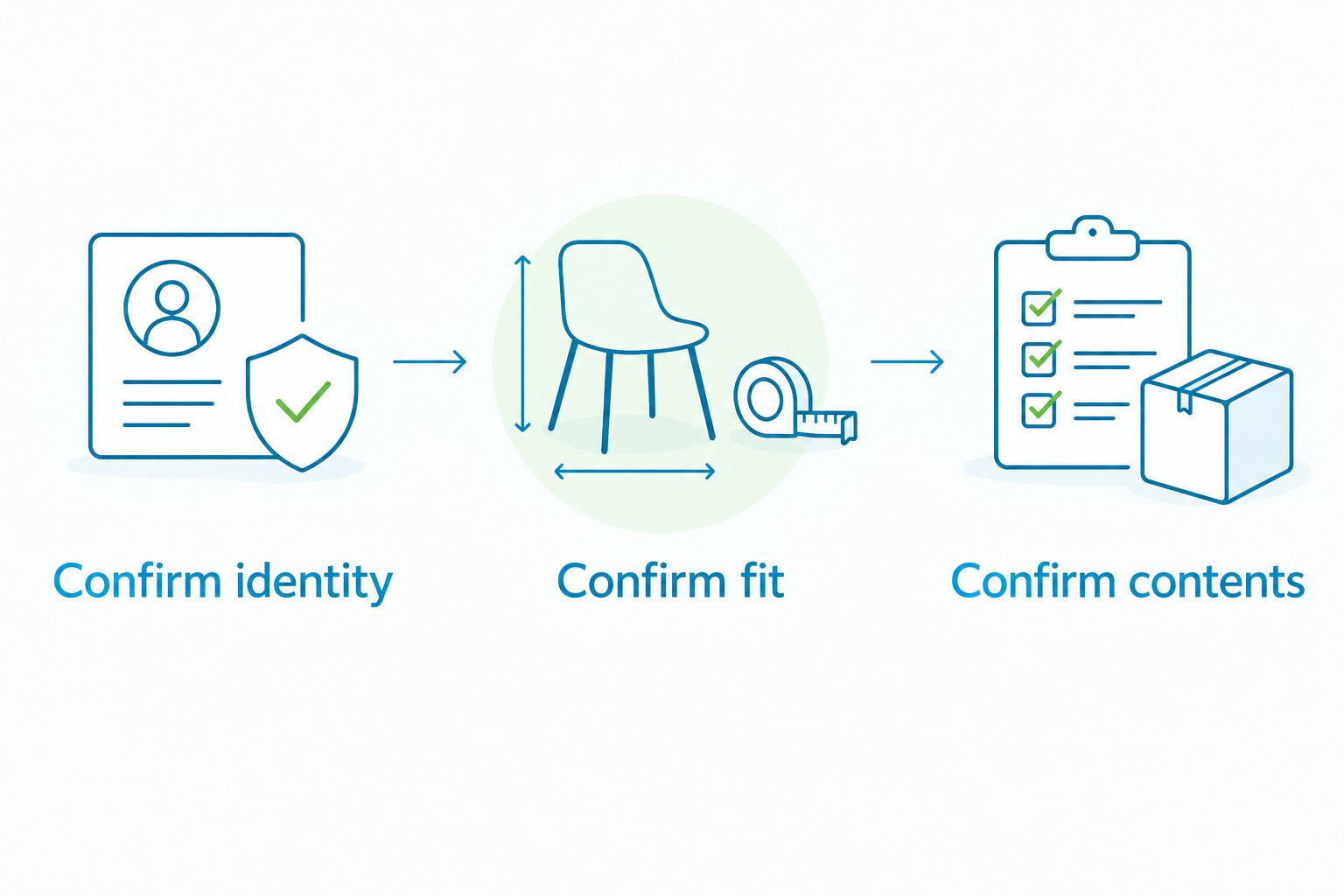
- Confirm identity. Match the product title and images with the item you meant to investigate.
- Confirm fit. Read the stated dimensions and compare them with your measurements, including any existing covers or inserts.
- Confirm contents. Read what the listing includes rather than treating the room photograph as a package description.
- Review the stated material and care information. If a detail determines whether the item suits your home, resolve it before proceeding.
- Where selectable options appear, check the selected option again before adding the item to your basket. Read the basket entry afterwards rather than relying on the photograph alone.
Expected result: the item, its selected option and its intended place in your room agree. You can explain what you are ordering without referring only to the Instagram image.
Use these 3 checks—identity, fit and contents—throughout your 2026 shortlist. They apply equally to a single bedding replacement and a larger room refresh.
A quilt and a quilt cover perform different roles. A photograph of a dressed bed does not tell you whether a listing contains the insert, the cover or other bedding, so read the contents carefully.
Revisit a saved post when your plans change
The adjacent workflow is not an automatic product alert: it is a deliberate review of your saved inspiration. Use it when you change your room layout, replace a mattress or reconsider the look you want.
- Open the saved post and remind yourself which object originally interested you.
- Reopen the product destination or locate the item through the retailer’s website.
- Read the current listing rather than relying on notes copied earlier in 2026.
- Compare the item with your updated measurements and room requirements.
- Remove the item from your shortlist if it no longer fits the plan, even if you still like the photograph.
Expected result: your saved collection remains a useful planning reference, not a substitute for checking the current product description.
Saving a post does not reserve a piece, select an option or complete an order. Keep inspiration, product selection and checkout as separate decisions.
Troubleshooting
The post has no shopping tag
Use the caption to identify any named item, then browse the retailer’s website separately. If no product name appears, record the visual features without claiming an exact match.
A missing tag is not a reason to follow an unrelated account or enter payment details through a message. Stay with the website-first route.
The tag opens the wrong object
Return to the post and check which object the tag identifies. A room image can contain several pieces, and the tagged item need not be the one you noticed first.
Compare the destination’s product title and images with your intended item. If they do not agree, restart identification rather than continuing through checkout.
The Instagram destination will not open
Open the retailer’s website in your usual browser and find the item there. Keep the original post accessible so you can compare it with the listing.
This avoids making an embedded browser problem part of your product decision. Do not keep retrying a broken route when you already have a separate reference point.
The size name looks right, but the measurements differ
Use the stated dimensions, not the size name alone. Check the specific pieces that must fit together, such as a pillow and pillowcase or a quilt and cover.
For furniture, measure the intended position and the access route separately. A piece fitting its final position does not establish that it fits through every doorway on the way there.
The photograph shows more than the listing includes
Treat the written contents as the purchase reference. Identify the additional styling pieces separately rather than assuming they accompany the featured item.
If the contents remain unclear, seek clarification through the contact information presented on the retailer’s website before ordering.
Customise your workflow
For bedding, organise your shortlist around the layers you actually need: sleeping surface, sheets, pillows and quilt. Choose the functional pieces before adding decorative layers solely to recreate a photograph.
For furniture and lighting, organise by position and purpose. A bedside reading setup needs its own measurements and lighting considerations; a living-room inspiration image does not answer those questions for you.
Elegante is best for shoppers seeking InterContinental Hotels bedding alongside designer furniture, lighting and homewares. The benefit is a connected room-planning brief; the limitation is that the assortment alone cannot tell you whether a particular piece suits your measurements or comfort preferences.
Keep a short note beside each candidate: intended position, required dimensions and the unresolved detail. Resolve that detail before moving the item into your final selection.
FAQ
How do I shop Elegante Instagram Shopping posts?
Open the post and use a product tag when one is present, then verify the item on the retailer’s website. If no tag appears, use the caption and website to identify the piece without assuming an exact match.
Do I need an Instagram business account to shop?
No, this shopper workflow does not require a business account or catalogue connection. Sign in to Instagram if you want to save posts and revisit your inspiration.
Can I order directly inside Instagram?
Use the purchase route actually presented, rather than assuming an in-app checkout is provided. You can browse the retailer’s website separately and review the item there.
What should I do if an Instagram post has no product tag?
Read the caption for an explicit product name and look for the item on the retailer’s website. If the identity remains uncertain, keep the photograph as inspiration rather than treating a similar product as a confirmed match.
Does saving an Instagram post reserve the product?
No, saving a post keeps an inspiration reference; it does not reserve a product or create an order. Recheck the product description and selected options when you decide to proceed.
How do I know whether the whole bedding look is included?
Read the product listing’s stated contents. A styled photograph can show a quilt, cover, pillows and accessories without establishing that they are sold together.
What should I check before buying hotel-style bedding online?
Check product identity, dimensions and included items first. Then review the stated materials and care information against your preferences and existing bedding.
One last thing
Keep the product title beside the saved image. A photograph preserves the look you loved, but the title gives you a practical starting point when you return to the shortlist.
For a room refresh in 2026, make the final decision from the verified listing and your measurements. Let the Instagram image guide the styling, not define the contents of your order.


Comments (0)
There are no comments for this article. Be the first one to leave a message!